Automating Security Remediation from Discovery to Fix
This cookbook guides you through a complete workflow: identifying a security issue, fixing it with a blueprint, and verifying the resolution.
Objective
Protect sensitive data by preventing accidental public exposure of S3 buckets.
In this guide, we will use CloudAgent's recommendation engine to identify the risk and the blueprint builder to remediate it automatically.
Step 1: Assessment
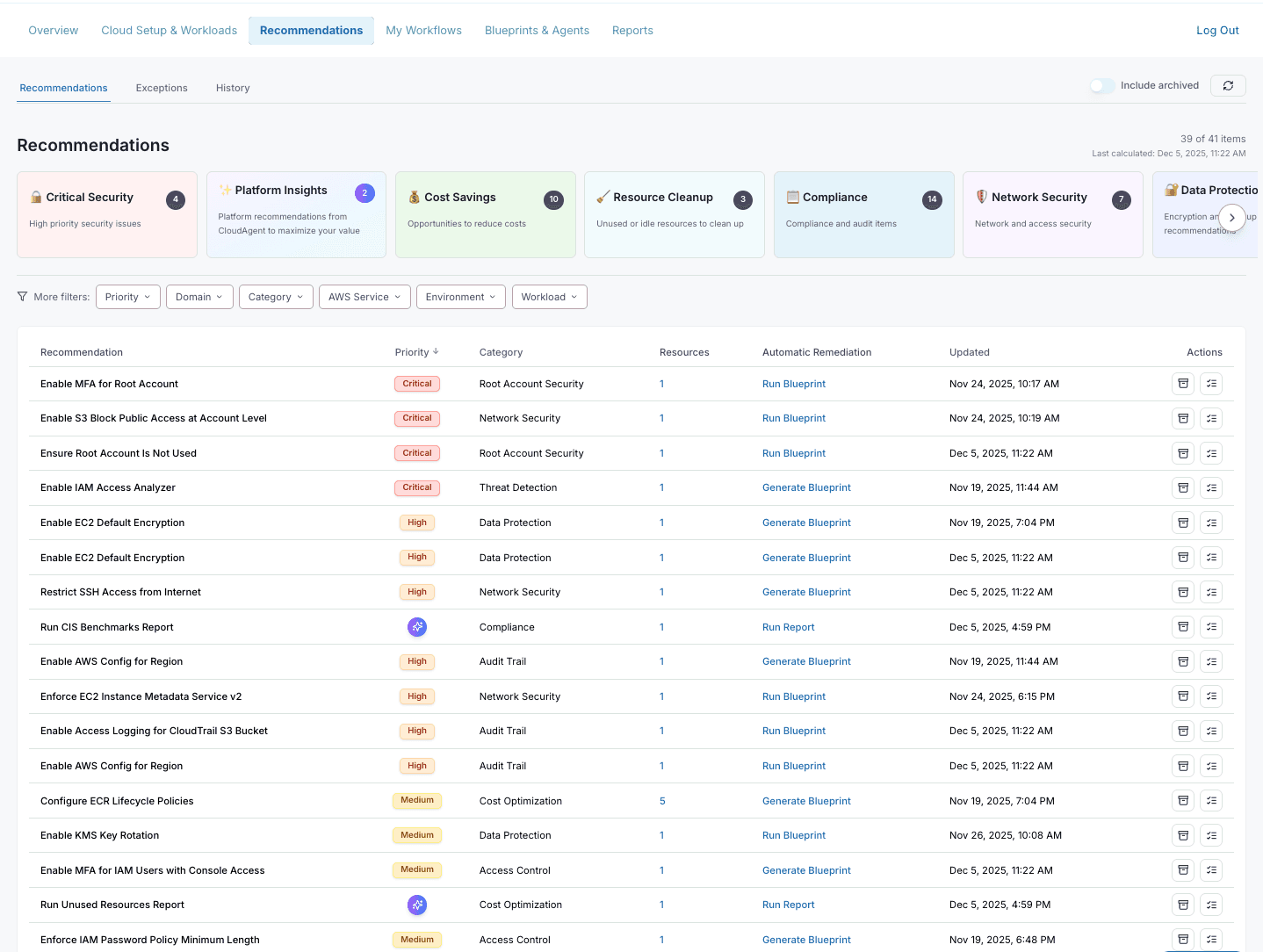
Start by reviewing the Recommendations page to identify security findings.
- Navigate to Recommendations in the sidebar.
- Review the recommendation categories at the top (Critical Security, Cost Savings, Resource Cleanup, etc.).
- Look for recommendations in the Critical Security category.
- Locate the recommendation: "Enable S3 Block Public Access at Account Level".
Tip: Click on a category card to filter the list by that category.
Public S3 buckets can expose sensitive data. Remediate this promptly unless public access is intentionally required.
Step 2: Remediation
CloudAgent allows you to generate a remediation blueprint directly from the recommendation.
- Find the recommendation in the list.
- Click Run Blueprint or Generate Blueprint in the Automatic Remediation column.
- This opens the Blueprint Builder with a pre-configured template.
- Review the generated CloudFormation template.
- Click Execute to apply the fix.
Example Snippet
The blueprint will configure S3 Block Public Access at the account level:
Type: AWS::S3::AccountPublicAccessBlock
Properties:
  AccountId: !Ref AWS::AccountId
  PublicAccessBlockConfiguration:
    BlockPublicAcls: true
    BlockPublicPolicy: true
    IgnorePublicAcls: true
    RestrictPublicBuckets: true
Step 3: Validation
Once the deployment is complete, verify that the issue is resolved.
- Go back to the Recommendations page.
- Check that the recommendation status has changed or the item is no longer listed.
- Optionally, run a compliance report to confirm the fix.
You have successfully identified, remediated, and verified a security finding using CloudAgent.
Next Steps
- Recommendations: Learn how to filter, prioritize, and act on all recommendation types
- Blueprints & Agents: Create custom blueprints for your organization's common remediation patterns
- My Workflows: Automate recurring remediation tasks with scheduled workflows
- Reports: Run compliance reports to track your security posture over time